Reading Time: 4 minutes
Air Aware to replace B4UFLY

Air Aware is the new app which will replace B4UFLY and comes from Aloft.ai in cooperation with the Pilot Institute.
B4UFLY was released by the FAA many years ago to aid drone pilots to safely fly their drones. It showed the airspace and other restrictions around your planned drone operation area. The app was never really good, and it took a while before an Android version of B4UFLY was released.
Meanwhile Aloft released the Kittyhawk app which helped drone pilots manage their fleet and also fly save by showing airspace information. In 2019 Aloft partnered with the FAA to power the B4UFLY app which improved the app. The Kittyhawk app eventually became Air Control, a sophisticated app to manage your fleet and request LAANC authorization where necessary.
Today, December 17, is another milestone day for Aloft. Aloft, in cooperation with the Pilot Institute, released a new app for Android and iOS – Air Aware. December 17 is also the anniversary day of the powered flight of the Wright Brothers in Kitty Hawk, NC.


There is also a web app which you can use conveniently in your browser for easier planning on a computer.
Features of the App
The app will give you information about air space. You can check the air space at your current location or any location on the map to see flight restrictions and what air spaces are in the area. This is very useful, and every pilot is required to do so before flying a drone. You can plan your flight and submit it only so it will show up for other users on the map. It will only show an area not your exact location.
Until now you can’t request a LAANC authorization with Air Aware yet. You must do so with other apps, for example Air Control by Aloft. If you have the app installed, the menu button will open the app for you, and you can proceed with your authorization.
The menu of the app also offers a link to the Pilot Institute which offers a lot of free drone courses. It is worth a look and helps to educate yourself even further.
One of the biggest advantages of the app is that there is no registration required to use the app. So far, I have used Air Control by Aloft to check the air space, but the app is a nightmare as every time I want to use it, I have to log in again over and over. This is especially for recreational flyers a big downside.
Bugs
I found a few bugs in the app (v1.0.1).
- The layer button in the top right corner brings up a menu but you can’t select or deselect any layers. Hope this will be fixed soon.
Update 2023-12-18: I contacted Aloft about the issue with the layers and in one mail they told me you can turn the layers on and off, and in a follow up email I got told that the layers are fixed and only in Air Control you can use the layer button. I guess Aloft doesn’t even know how the button should work. If the layers should be fixed in this app, why even have the button in the first place?
- There is also a checklist button in the lower right corner, next to the Notify & Fly button. This button only shows up when you put your device in landscape mode, at least on Android.
Update 2023-12-18: I told Aloft about this issue, they wanted screenshots, and I guess they are still not understanding the problem but stopped replying. Not very great service.

It brings up a checklist which is great, but the Getting Started Checklist should be modified a bit. This checklist includes.
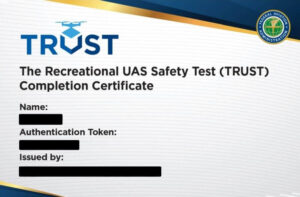
You should be able to add your trust certificate to the app, even when the app only stores a copy of it locally on your device. This makes it easier to find your certificate and you wouldn’t have to check it every time when going through the checklist.
Update 2023-12-18: Aloft liked my idea about adding the TRUST certificate.
The rest of the checklists make sense and should be completed by every pilot before each flight to make sure they didn’t forget anything.
- I am also a bit annoyed that the app splash screen shows up all the time. Very annoying. All these issues were observed on my Android phone.
I can’t speak about the iOS app. If anyone has experience,
feel happy to chime in and leave a comment
.
Conclusion
Overall, a great app so far. I love that you don’t have to sign up for an account to use it. This is great for recreational flyers. I am sure you will be required to have an account if they implement LAANC authorization.
The official news release is available here.

Peter is an award-winning photographer who travels all over the world to capture the beauty of our planet as well as the achievements of humanity. Follow Peter on his travel blog Gate to Adventures for more amazing places to go and explore.